One of the modules on my website, Book Review, is old and hasn't been updated since September 2007. Drupal has a great version/stability tracking system, and it's clear that this module isn't maintained anymore. Over time I want to upgrade my website to Drupal 6 so it's time to move away from unsupported modules.
On a technical level a book review is just a couple of text fields (author, ISBN number) combined with the standard Drupal text fields body and title. That makes it a great candidate for creating of a custom Node using Drupal's Content Creation Kit (CCK).
Here is how I converted from module Book Review CCK using the excellent node_import module and custom MySQL statements to export book reviews to a Comma Separated Value (CSV) file.
I'm using Book Review version 5.x-1.x-dev and CCK version 5.x-1.10. For completeness, my PHP version is 5.2.6 and I'm running MySQL 5.0.15a on OpenBSD.
The first step is to create a new content type. Go to /admin/content/types/add and create a new content type. I'd recommend to use the name "Book review" and type "book_review" (notice the underscore). The other field names and options are matter of personal preference and don't matter for the conversion. The Name and Type fields need to be unique, so on my system I renamed the existing (module's) content type to "Book review old".
I did not use all fields of the book review module. Here are the fields that I used:
Title - the title of the book. This will be mapped to the title field of the CCK node.
Review - the actual review. This will be mapped to the 'body' of the CCK node.
Date - the date of the review. This will be mapped to the date field of the CCK node.
Author - author of the book.
ISBN - ISBN of the book
Cover picture - a link to an image file on my site. Example: "/images/books/otherpeoplestrades.jpg".
In addition we'll port a couple of other Drupal internal fields such as "promote to frontpage", "comment settings etc".
Old_nid - For the migration of our comments, we'll add a tempory field.
The fields "Title", "Review" and "Date" are part of the standard Drupal Node. Let's create the Author, ISBN and Cover Picture fields to the CCK node.
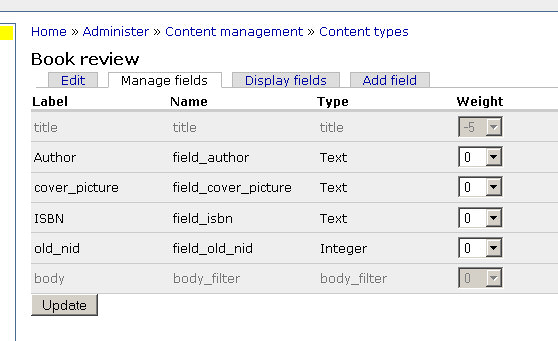
For simplicity I'm assuming each bookreview has 1 author (table bookreview_authors). I don't have anything in bookreview_links.
mysql>SELECT 'nid','status','created','changed','comment', 'promote','moderate', 'sticky',
'uid','booktitle','author', 'cover', 'isbn', 'review' UNION SELECT bookreview.nid, status,
created, changed, comment, promote, moderate, sticky, uid, booktitle, author, cover, isbn,
review INTO OUTFILE '/tmp/export.csv' FIELDS TERMINATED BY ',' ENCLOSED BY '"' ESCAPED BY '\\'
LINES TERMINATED BY '\n' FROM (bookreview LEFT JOIN bookreview_authors ON bookreview.nid = bookreview_authors.nid)
INNER JOIN node ON bookreview.nid = node.nid;
This will result in a 'export.csv' file in your /tmp directory, and contains the content of all your bookreviews.
To clean up the file:
sed 's/\\N//g' export.csv > export.tmp
perl -p -e 's/\\\n/<br \/>\n/g' export.tmp > export.tmp2
tr -d '\r' < export.tmp2 > export.csv
This will create a file with a structure like this:
"nid","status","created","changed","comment","promote","moderate","sticky","uid","booktitle",
"author","cover","isbn","review"

"1755","1","1036105200","1036105200","2","0","0","0","24","Ooggetuigen van de vaderlandse geschiedenis",
,"http://www.guusbosman.nl/images/books/ooggetuigen.jpg","","A compilation of articles ... "
Now, install the node_import module (http://drupal.org/project/node_import), activate it and go to /admin/content/node_import. Select your CSV file, choose "Book review" for Type. Map all the fields appropriately; there's no need to customize the Options. Here's the mapping I used:
- nid
- old_nid_value (field_old_nid)
- status
- Node: Published
- created
- Node: Authored on
- changed
- Node: Last updated on
- comment
- Node: Comment options
- promote
- Node: Promoted to frontpage
- moderate
- Node: In moderation queue
- sticky
- Node: Sticky at top of lists
- uid
- Node: Authored by
- booktitle
- Title
- author
- Author value (field_author)
- cover
- cover_picture value (field_cover_picture)
- isbn
- ISBN value (field_isbn)
- review
- Body
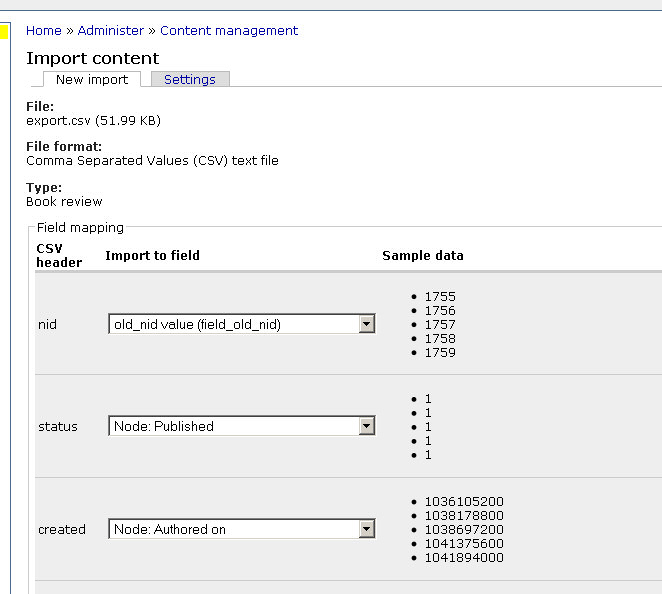
Now you'll have 2 versions of each of your book reviews, one of the old 'bookreview' type, and one of the new 'book_review' type. The last thing remaining is to migrate any comments.
Here's how you can check if you have any comments assigned to book reviews:
SELECT node.type, node.title, node_comment_statistics.comment_count
FROM node INNER JOIN node_comment_statistics ON node.nid = node_comment_statistics.nid
WHERE (((node.type)="bookreview") AND ((node_comment_statistics.comment_count)>0));
This is how you see what the mapping from the old nid to the new nid is:
SELECT field_old_nid_value AS old, content_type_book_review.nid AS new FROM comments, content_type_book_review
WHERE comments.nid = content_type_book_review.field_old_nid_value;
For each combination, do the following: (I had only 3 comments in my database so I didn't feel like automating this completely. You may want to script this if you have more than a trivial amount of comments).
UPDATE node_comment_statistics AS a JOIN node_comment_statistics AS b ON (a.nid=2843 AND b.nid=1790)
JOIN node_comment_statistics AS c ON (c.nid=a.nid) SET a.nid=-a.nid,b.nid=2843,c.nid=1790;
UPDATE comments set nid = 2840 WHERE nid = 1790;
In the example above 2843 is the new nid for the old 1790 nid.
After this, you're essentially done with the migration; all you have to do is update your Views appropriately. You can now delete the old "Book review Old" nodes, and over time you can delete the old_nid column from "Book review".
Notes & suggestions for improvements:
- The newly created nodes may use '<br />' to create line breaks. Make sure that your HTML filter allows this for the Input format that you selected for Book Reviews
- If you care about tracking how often an article is read, you'd need to update table node_counter manually
- It would be good to automate the comment conversion.
- This conversion doesn't work very nicely for non-ASCII characters in the author or title field (body field is fine).
 My article was posted on Slashdot!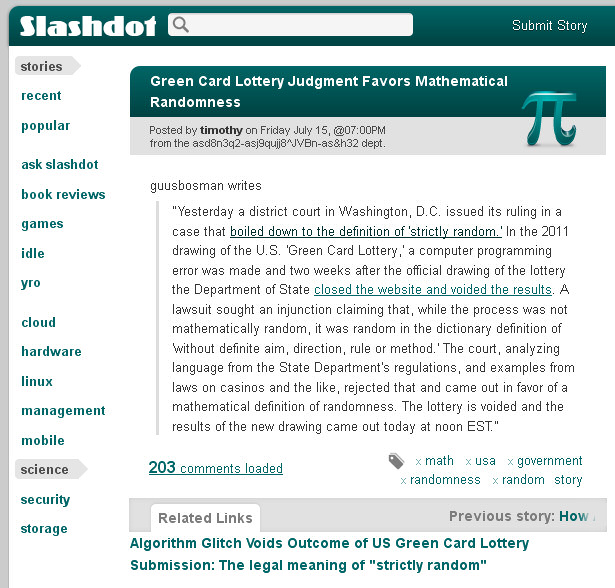
 You can now log in to Guus Bosman.nl using your Facebook.com account.
  The next few articles will be available for registered users only.